Timelines have always been the most effective way to tell a visual story. Whether you are showcasing a company history, a product roadmap, or a personal journey, a well-designed timeline turns boring bullet points into an engaging narrative.
But we are in 2026. The rules have changed.
While standard timeline plugins still exist, the demand is no longer just for “design” but for speed and intelligence. You don’t want to spend hours manually entering dates and dragging images. You want a tool that builds the story for you.
In this article, we will explore the best WordPress timeline plugins available in 2026. However, we will put a special focus on the game-changer of the year: AI-powered timeline builders, specifically TimelineX AI .
Why Timelines Matter More in 2026
User attention spans are shorter than ever. A static list of “Our History” no longer cuts it. Modern timelines need to be:
- Interactive: Users want to click, hover, and explore.
- Visual: Rich media, icons, and custom colors are mandatory.
- Instant: If it takes longer than 5 minutes to build, it’s a distraction.
The #1 Pick for 2026: TimelineX AI (The AI Story Timeline Builder)
Let’s address the elephant in the room immediately. If you are looking for the most innovative, time-saving, and powerful timeline plugin this year, TimelineX AI is the definitive winner.
While other plugins force you to manually input every single event, TimelineX AI does something revolutionary: It writes the timeline for you.
The “AI Story Generator” Feature
Imagine you want to create a timeline about “The History of Space Exploration.” With standard plugins, you would need to open Wikipedia, copy dates, write descriptions, and upload images. That takes hours.
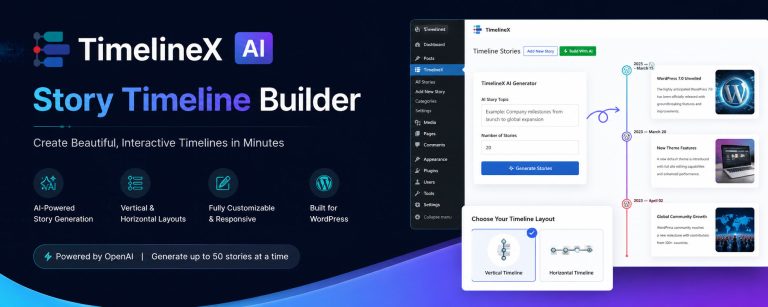
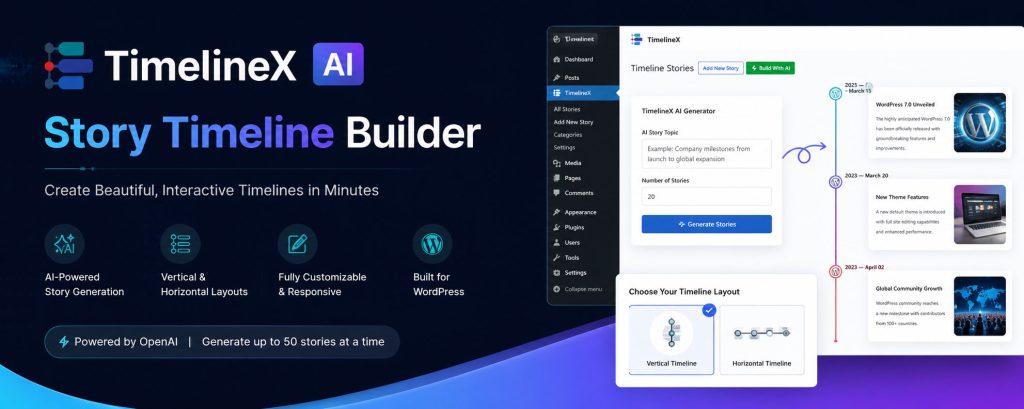
With TimelineX AI, you simply type the topic, select the number of stories (e.g., 10 milestones), and click generate. Within seconds, the plugin populates your timeline with titles, descriptions, and structured storytelling using advanced AI.
Key Features of TimelineX AI
- 🤖 AI Story Generator: The headline feature. Generate entire company milestones, historical events, or roadmaps instantly.
- ⚡ Elementor & Gutenberg Support: Works natively with the two biggest page builders. No shortcode memorization is needed (though shortcode support exists too).
- 🎨 Multiple Layouts: Choose from Vertical, Horizontal, Both-Sided, One-Sided, and Compact Modern Card layouts.
- 📱 Fully Responsive: Looks flawless on mobile, tablet, and desktop in 2026.
- 🔗 Unlimited Stories: Unlike some lite versions, you can create massive timelines with 100+ stories using Ajax Load More and Year Navigators.
Verdict: If you want to save time and stay ahead of the curve, TimelineX AI is the only plugin on this list that utilizes 2026 technology. It is perfect for bloggers, marketers, and agencies.
>> Get TimelineX AI Here (Starting at $29/year)
4 Other Notable WordPress Timeline Plugins (Legacy Options)
While we highly recommend the AI approach, here are other reliable plugins you might encounter in 2026.
1. Post Timeline
A solid choice that has been around for years. Post Timeline offers 50 different templates and excellent customizability. However, it requires manual entry for every event. It lacks the AI generation that makes TimelineX AI special.
- Best for: Users who need very specific, hand-crafted design templates.
- Price: ~$25
2. Cool Timeline Pro
This plugin is great for creating “cool” horizontal and vertical timelines. It has a proven track record with over a million downloads. It integrates well with Elementor but remains a manual drag-and-drop builder.
- Best for: Users who prioritize animation styles over content creation speed.
- Price: ~$25
3. ElementsKit
ElementsKit is an all-in-one Elementor addon that includes a timeline widget. It is powerful if you already own ElementsKit for other features (like mega menus or social feeds), but as a standalone timeline builder, it lacks depth and dedicated support for storytelling.
- Best for: Users who already own the full ElementsKit suite.
- Price: $39+/year
4. Bold Timeline Lite
A simple, lightweight plugin best for beginners. It offers 5 distinct styles (Classic, Retro, Clean, etc.). Unfortunately, the free version is very limited, and the interface feels a bit dated compared to modern AI-driven plugins.
- Best for: Simple websites on a tight budget.
- Price: Free / Pro version available.
How to Choose the Right Plugin in 2026
When selecting your timeline plugin this year, do not just look at “price” or “styles.” Ask yourself these three questions:
1. How much time do I have?
If you are building a timeline with 20+ events, manual entry is a nightmare. TimelineX AI is the only plugin that solves the “blank page syndrome” by generating the content for you.
2. Is it ready for page builders?
All plugins support shortcodes, but TimelineX AI and Post Timeline offer the best native Gutenberg blocks and Elementor widgets, allowing you to see changes live as you edit.
3. Does it support “Storytelling”?
A timeline is a story. Look for plugins that allow custom text instead of dates (e.g., “Step 1” instead of “Jan 1st”) and support for video slideshows. TimelineX AI excels here with its card-based modern UI.
Don’t Get Left Behind in 2026
The WordPress plugin market is evolving. You can still use the “old guard” of timeline plugins like Cool Timeline or Post Timeline, and they will work fine. However, you will be doing 100% of the heavy lifting.
To maximize your efficiency and create engaging stories in minutes (not hours), your best bet is to invest in the future.
TimelineX AI is not just a timeline plugin; it is your personal content assistant. It blends the power of AI with the flexibility of Elementor/Gutenberg, making it the undisputed Best WordPress Timeline Plugin for 2026.
Ready to revolutionize your timelines?
👉 Try TimelineX AI Today 👈
Frequently Asked Questions
Can I use TimelineX AI with my existing theme?
Yes. TimelineX AI is coded to WordPress standards and works with 99% of themes, including Astra, GeneratePress, and Kadence.
Is TimelineX AI compatible with Elementor?
Absolutely. It comes with a dedicated Elementor widget, so you can drag and drop your AI timelines directly into your designs.
What if I need a refund?
TimelineX AI offers a 14-day money-back guarantee. No questions asked.